There are few things more frustrating than a slow website. You click a link, and then you wait… and wait. For website owners, this is more than just an annoyance; it’s a critical business problem. A slow website leads to high bounce rates, poor user experience, and lower rankings in Google search results.
The good news is that a slow website is almost always a fixable problem. The culprits are usually a handful of common issues that, once identified, can be systematically resolved.
At HimariDT, we’re giving you the ultimate troubleshooting checklist. We’ll show you how to diagnose the problem and then walk you through the five most common reasons for a slow website and, most importantly, how to fix them.
First measurement
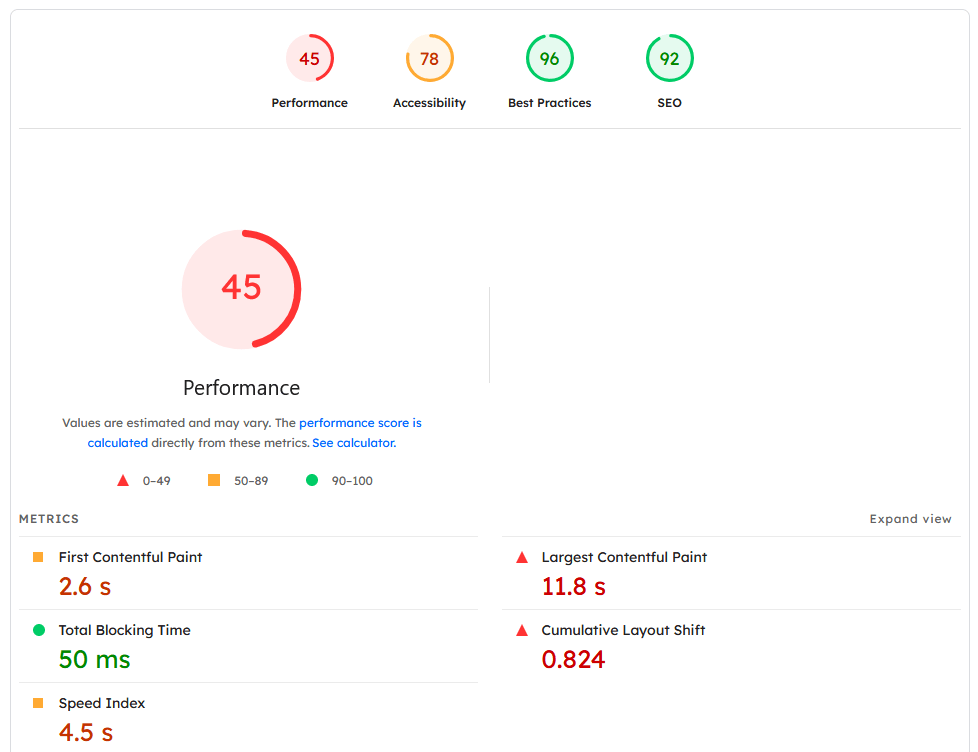
Before you start changing things, you need to get a baseline measurement. Running a speed test will give you a performance score and, more importantly, a list of specific recommendations.
Go to one of these free tools and enter your website’s URL:
- Google PageSpeed Insights: The gold standard, as it shows you how Google sees your site’s performance, including the crucial Core Web Vitals.
- GTmetrix: Another excellent tool that provides very detailed reports and grades on various aspects of your site’s speed.
Once you have your report, you’ll likely see some of the following issues flagged. Let’s tackle them one by one.
Unoptimized images
Large, high-resolution images are, without a doubt, the most common cause of slow-loading pages. An image straight from your smartphone or camera can be 5MB or more, which is enormous for a web page that should ideally be under 2MB in total.
- Compress your images: Before you upload any image, you should compress it. Compression reduces the file size significantly without a noticeable drop in quality. You can use free online tools like TinyPNG or TinyJPG. For WordPress users, plugins like Smush or ShortPixel can automate this process for every image you upload.
- Resize to the correct dimensions: Don’t upload a massive 4000-pixel wide image if your blog’s content area is only 800 pixels wide. Your browser has to load the giant image and then shrink it, which is a huge waste of bandwidth. Resize your images to the exact dimensions they will be displayed at before you upload them.
- Use modern image formats: In 2025, you should be using modern image formats. WebP and AVIF offer far better compression than older formats like JPEG and PNG. Most image optimization plugins can automatically convert your images to these formats and serve them to compatible browsers.
Poor quality or overpowered web hosting
Your web host is the engine of your website. If you’re on a cheap, low-quality shared hosting plan, your server is likely slow and sharing resources with hundreds of other websites. When traffic spikes (even on a neighboring site), your performance will suffer.
- Check your server response time: Your speed test report will likely show a metric called Time to First Byte (TTFB). This is how long it takes for the server to start sending data back to the browser. A high TTFB is a clear sign of a slow server.
- Upgrade your hosting plan: If you’re just starting, a premium shared hosting plan from a reputable provider (like Hostinger or SiteGround) is often enough. As your site grows, consider upgrading to a VPS (Virtual Private Server) for more dedicated resources.
- Choose a host with modern tech: Look for hosts that offer technologies like LiteSpeed servers, the latest versions of PHP, and HTTP/3.
Not using website caching
By default, every time a visitor comes to your site, the server has to fetch information from the database, assemble the page, and then send it to the browser. This process is repeated for every single visitor.
Caching creates a ready-made, static HTML copy of your page. When a visitor arrives, the server can just send them this pre-built copy, which is dramatically faster.
Many modern hosts, especially those with LiteSpeed servers, offer their own powerful caching solutions (like the LiteSpeed Cache plugin). These are often more effective than generic plugins because they are optimized for the server’s specific environment.
Not using a Content Delivery Network (CDN)
The physical distance between your website’s server and your visitor matters. If your server is located in a datacenter in the USA, it will naturally take longer for a visitor from Ho Chi Minh City to load your site because the data has to travel halfway around the world.
A CDN (Content Delivery Network) solves this problem by storing copies of your site’s static assets (images, CSS, JavaScript) on a global network of servers.
- The most popular and highly recommended CDN is Cloudflare. It has a fantastic free plan that is perfect for almost any website.
- When a visitor from Vietnam accesses your site, Cloudflare serves the images and other assets from its closest server (e.g., in Singapore), drastically reducing the travel time (latency) and speeding up your site.
Conclusion
A slow website can be a major roadblock to your online success, but it’s a problem with clear solutions. By following this checklist, you can systematically address the most common performance bottlenecks:
- Optimize your images.
- Invest in quality hosting.
- Enable caching.
- Use a CDN.
Start by measuring your site’s speed, tackle one issue at a time, and test again to see the impact. A fast website isn’t a one-time fix, but an ongoing process of optimization that pays huge dividends in user satisfaction and search engine visibility.