Have you ever noticed the little padlock icon next to a website’s address in your browser? Or seen the URL start with https:// instead of just http://? That tiny lock is one of the most important symbols on the internet. It’s a sign of trust, security, and a modern, professional website.
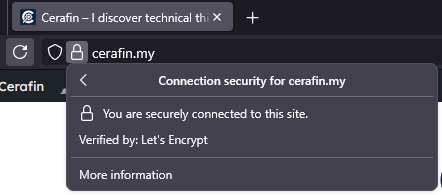
If your site is missing that lock, browsers like Google Chrome are likely warning visitors that your site is “Not Secure”. This can scare away potential customers and hurt your reputation.
Welcome to HimariDT! Today, we’re going to discover the website security. We’ll explain in simple terms what SSL and HTTPS are, how they work, and why they are absolutely non-negotiable for any website in 2025.
HTTP vs HTTPS
To understand website security, let’s start with a simple analogy.
What is HTTP?
HTTP (Hypertext Transfer Protocol) is the fundamental protocol used to send data between your web browser and a website’s server. By default, HTTP is insecure.
Think of it like sending a postcard. Anyone who handles that postcard along its journey – the postal worker, the sorting office staff – can read the entire message.
When you submit information on an HTTP website (like a username, password, or contact form details), that data travels across the internet as plain, readable text. A hacker on the same public Wi-Fi network could easily intercept and read it.
What is HTTPS?
HTTPS (Hypertext Transfer Protocol Secure) is the secure version of HTTP. The “S” makes all the difference.
Think of HTTPS as sending a sealed, tamper-proof envelope. The message is enclosed and protected. Only the intended recipient has the special key to open it.
When you submit information on an HTTPS website, the connection between your browser and the server is encrypted. This means the data is scrambled into a complex code that is unreadable to anyone who might intercept it. It protects sensitive information and ensures your privacy.
The SSL certificate
So, how does a website switch from the insecure postcard (HTTP) to the secure envelope (HTTPS)? The magic is enabled by something called an SSL Certificate.
SSL stands for Secure Sockets Layer. While the technology has technically been updated to TLS (Transport Layer Security), the term “SSL” is still widely used.
An SSL certificate is a small data file installed on your web server that acts as your website’s digital passport or ID card. It has two primary jobs:
- Encryption: It enables the secure HTTPS connection, scrambling all the data that passes between the visitor’s browser and your server.
- Authentication: It cryptographically proves that your website is who it claims to be. It verifies to the browser that it is connected to the real
himaridt.buzzserver, not a fake imposter site set up by a hacker to steal information.
When you visit a site with a valid SSL certificate, your browser and the server perform a “handshake” to establish a secure link. If the certificate is valid, the padlock icon appears, and you know your connection is safe.
Why is HTTPS really important in 2025
Years ago, HTTPS was mostly for banks and e-commerce stores. Today, it is an absolute requirement for all websites. Here’s why:
Trust and credibility
The padlock icon is an instant visual cue that your website is professional and trustworthy. In an age of widespread data breaches, users are actively looking for it. The “Not Secure” warning, on the other hand, is a credibility killer and will cause visitors to leave immediately.
SEO and Google rankings
Google has officially confirmed that HTTPS is a positive ranking signal. If two websites are equal in all other aspects, the one that is secure will rank higher in search results. Running your site on HTTP is actively harming your SEO efforts.
Security
Of course, the primary reason is security. If your website has a login form, a contact form, or any place where users can enter information, you have a responsibility to protect that data. HTTPS is the standard for doing so.
Performance
An old myth was that HTTPS slowed down websites. This is no longer true. Modern web protocols like HTTP/2 require HTTPS and actually provide significant performance improvements, leading to faster loading times than on old HTTP sites.
Getting a SSL certificate and enabling HTTPS
The best part is that securing your website is now easier and more affordable than ever.
The easy (and free) way
Thanks to a non-profit organization called Let’s Encrypt, anyone can get a free, trusted SSL certificate. In 2025, virtually every reputable hosting provider (like Hostinger, SiteGround, Bluehost, etc.) has integrated Let’s Encrypt into their platform.
Getting one is usually as simple as:
- Logging into your hosting control panel (cPanel, hPanel, etc.).
- Navigating to the “SSL” or “Security” section.
- Selecting your domain and clicking an “Install” or “Activate” button.
The process is often automatic and takes just a few minutes.
Once the SSL certificate is installed, you need to ensure all visitors are automatically sent to the secure version of your site. Most hosting panels have a “Force HTTPS” toggle you can switch on. If you use WordPress, you can install a plugin like Really Simple SSL which handles this for you with one click.
In today’s digital landscape, website security isn’t an optional feature – it’s the foundation of a credible online presence. The padlock icon and HTTPS are no longer just for big corporations. They represent a fundamental promise to your visitors: “This is a safe place”.
Check your website’s address bar now. If you don’t see that 🔒, make it your number one priority this week. With free and easy tools available, there’s no reason to let your visitors see a “Not Secure” warning ever again.